Criteria for Resolving Account-Linking Errors and Missing Rewards From Watching Game Streams
Linking a streaming account to a game publisher account is only one part of receiving a viewing reward. A reward can fail before watch progress begins, after the viewing requirement is completed, during the claim step, or when the publisher attempts to deliver the item to the game.
That distinction matters because each failure requires a different response. Relinking accounts will not fix a stream that was not eligible for the campaign, while clearing a browser cache will not move a claimed item from the wrong game account. The fastest way to resolve the problem is to identify the reward’s current status before changing any account settings.
Start With the Reward’s Current Status
Open the streaming platform’s Drops or Rewards Inventory and find the campaign. On Twitch, this page displays active progress, rewards that are ready to claim, and rewards that have already been claimed. Twitch also notes that progress toward a Drop can normally be earned on only one participating channel at a time.
The status usually places the problem into one of four categories:
| Status | What It Usually Means | Where to Investigate |
|---|---|---|
| No progress appears | The viewing session may not qualify | Campaign, channel and login status |
| Progress appears but stops | The stream or reward sequence may have changed | Campaign conditions and previous rewards |
| Ready to Claim | The viewing requirement is complete | Drops Inventory |
| Claimed but missing in-game | Twitch recorded the reward, but delivery is incomplete | Linked game account and publisher support |
Do not begin by unlinking accounts. First take screenshots of the inventory status, campaign name and linked-account pages. Account changes can make it harder to determine where an already claimed reward was sent.
When Watch Progress Does Not Increase
If the progress bar remains at zero, confirm that the campaign is still active and that the channel is participating. A streamer playing the correct game is not necessarily enough; the channel must also be eligible for that specific Drops campaign.
Make sure you are signed in to the same streaming account whose Drops Inventory you are checking. Then open the campaign details and review its start time, end time, required viewing duration and eligible channels. Some campaigns are limited to selected creators or official broadcasts rather than every channel in the game category.
Watching several eligible streams at once does not normally multiply progress. Twitch states that viewers can progress toward a Drop on only one participating channel at a time. Keeping one eligible stream open makes it easier to determine whether tracking is working.
Some campaigns also arrange rewards in a sequence. The next reward may remain locked until the earlier one has been earned and claimed. Twitch’s Drops guidance specifically notes that certain rewards require a previous Drop to be claimed before progress toward the next one can begin.
If progress appeared and then stopped, check whether the creator changed games, ended the broadcast or left the eligible portion of the event. Reloading the inventory page can reveal whether the progress has already been recorded even when the stream page has not updated.
When the Viewing Requirement Is Complete but the Reward Has Not Been Claimed
Completing the watch requirement and receiving the game item are separate steps. When the progress bar reaches the required amount, return to the Drops Inventory and look for a Claim, Claim Now or Ready to Claim button.
Official Twitch guidance instructs users to claim earned rewards from the Drops Inventory. EA uses the same basic process in its current Twitch Drops instructions: watch an eligible stream, check progress, select Claim and then launch the game.
Do not assume every campaign uses the same claim deadline. Twitch’s general documentation may allow unclaimed rewards to remain available for a period after a campaign, while individual publishers can set shorter requirements for particular games or events. For example, some current EA game guidance requires certain rewards to be claimed within 24 hours. Always follow the deadline displayed for the campaign you joined rather than relying on a general rule.
If the inventory says Ready to Claim, the account-linking process may not be the problem yet. Claim the reward first and save a screenshot showing the new status.
When the Reward Says Claimed but Is Missing In-Game
A Claimed status is an important dividing line. It indicates that the streaming platform recorded the reward, so the next checks should focus on the linked publisher account, gaming platform and in-game delivery process.
Begin by identifying the exact game account connected to the streaming account. Do not judge this by whether the email addresses match. Streaming and publisher accounts can use different email addresses and still be linked correctly. What matters is the specific account shown on the connection pages.
Players often have several publisher or platform accounts created over time. A Twitch account may be connected to an older EA, Epic Games or Activision account, while the player currently launches the game through another account. EA warns that a Drop may be delivered to the different EA Account already linked to Twitch and that rewards claimed on the wrong account or platform may not be recoverable or transferable.
Check the entire account chain:
- The Twitch account used to watch and claim the Drop
- The publisher account linked to Twitch
- The Steam, PlayStation, Xbox or other gaming account connected to that publisher account
- The platform, character, region or server where the reward should appear
After verifying the account chain, close and relaunch the game. Also inspect the location specified by the campaign, such as an in-game mailbox, unopened packs, cosmetics menu or rewards tab. A reward may have been delivered without appearing as a general notification.
Delivery times vary by publisher and campaign. Some items appear immediately, while others require several hours. Current EA guidance for certain games says Twitch Drops may take up to 24 hours to appear in-game. Facepunch recommends allowing an initial delivery period before using its missing-Drops recovery process. These are game-specific examples, not universal waiting times.
Use the delivery time published for the relevant game. If no waiting period is stated, save the claim time and check the game again after restarting it before submitting a support request.
Relinking Accounts Is Not Always the First Fix
Many troubleshooting pages recommend unlinking and reconnecting accounts, but this should not be treated as an automatic first step.
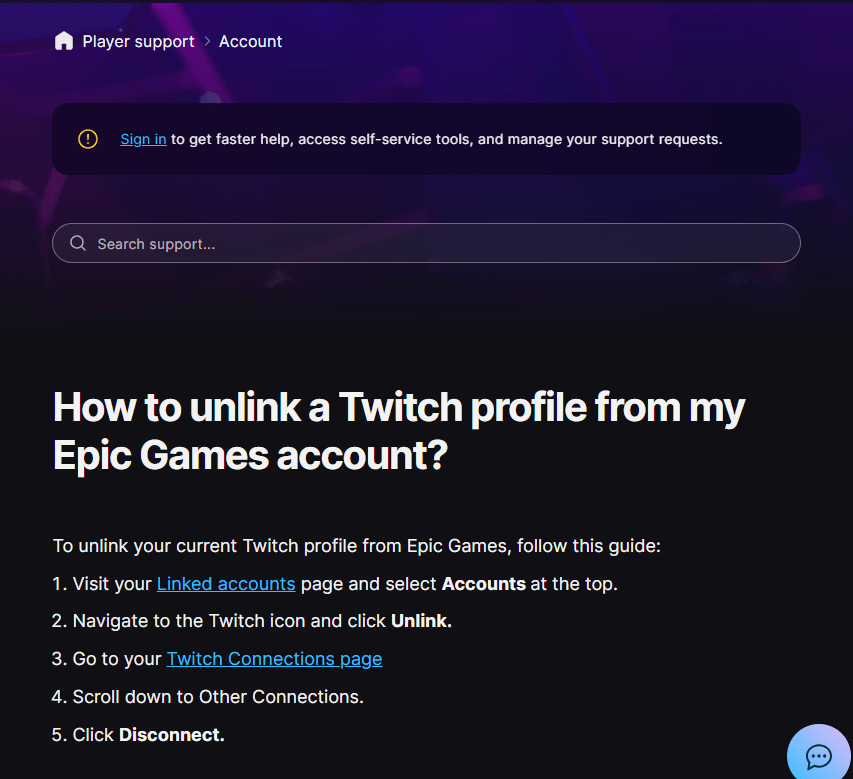
Relinking can help when the connection is expired, incomplete or attached to an account you no longer use. Epic Games, for example, includes unlinking and relinking among its troubleshooting steps for missing Fortnite Twitch Drops.
However, relinking after a reward has already been claimed may not redirect that reward to the new account. The reward may remain associated with the account that was connected at the time of the claim. Some publishers explicitly state that they cannot transfer Drops between accounts or platforms.
Before unlinking anything:
- Record the current Twitch and publisher usernames.
- Take screenshots of both connection pages.
- Check whether the publisher imposes account-linking restrictions.
- Read the game’s official Drops instructions.
- Determine whether the reward was claimed before or after the current link was created.
Relink only when you have identified an incorrect or broken connection, or when the publisher’s official troubleshooting instructions specifically recommend it.
Campaign Rules Can Override the Usual Process
A valid account link does not make every viewer eligible for every reward. Individual campaigns may impose conditions that are not part of the normal Twitch Drops process.
These can include selected countries, specific gaming platforms, approved channels, fixed broadcast windows, required account types or a limited claim period. Some promotions may also use a drawing or chance-based system rather than guaranteeing an item to every viewer. EA notes that certain viewing promotions can enter users into a drawing instead of guaranteeing a reward.
Review the official campaign page when:
- Progress never begins despite watching an eligible-looking stream.
- Other viewers receive a reward that does not appear in your inventory.
- The campaign is visible but unavailable for your account.
- You watched outside the stated event period.
- You expected a guaranteed item but the terms describe a drawing.
Avoid changing an account region or using a VPN to bypass campaign restrictions. This may conflict with platform or campaign terms and still will not change the eligibility data associated with the account.
Know Which Support Team Should Handle the Problem
The reward’s last confirmed status determines where a support request should usually go.
If no progress was recorded, the issue concerns campaign eligibility, viewing tracking or the streaming account. Recheck the campaign and Twitch Drops Inventory first.
If the reward reached Claimed status but never appeared in the game, the publisher is generally better positioned to investigate delivery. Twitch has already recorded the claim, while the publisher controls the game account and in-game inventory. EA forum guidance, for example, directs users whose Drop is claimed but still absent after relaunching the game to support for further assistance.
Prepare the following information:
- Streaming platform username
- Publisher and gaming-platform usernames
- Campaign and reward name
- Date and approximate time watched
- Date and time claimed
- Screenshot of the Drops Inventory
- Screenshot of the connected-account pages
- Platform, region, server or character used
- Steps already attempted
Describe the last successful stage precisely. “The progress bar reached 100% and the reward shows Claimed, but it is absent from the in-game mailbox” is far more useful than “My reward did not work.”
Some publishers also impose a deadline for missing-reward claims. Activision currently states that eligible missing Call of Duty viewership rewards can be restored only within a specified period after the program ends. Submitting the request promptly is therefore safer than waiting indefinitely.
FAQ
Can a claimed reward be moved to another game account?
Usually not. Once a reward has been claimed, it may be assigned to the publisher or platform account connected at that time. Several publishers state that Drops cannot be transferred between accounts or platforms. Verify the linked account before claiming whenever possible. citeturn335441search3turn335441search12
How long should I wait after claiming a stream reward?
Use the timeframe stated by the game publisher. Delivery may be immediate for one campaign and take several hours for another. Some EA game guides advise allowing up to 24 hours, but this is not a universal rule for all games or campaigns.
Will unlinking and relinking recover a missing reward?
It may repair future tracking when the existing connection is broken, but it does not guarantee recovery of a reward already claimed. First verify where the claimed reward was sent and follow the publisher’s game-specific instructions. Relinking too early can make the account history more difficult to trace.
A linked badge only shows that a connection exists. It does not prove that the stream qualified, that the reward was claimed, or that the correct game account received it. By locating the last successful step—progress recorded, reward earned, reward claimed or item delivered—you can investigate the correct system and avoid account changes that do not address the actual problem.